

Want to buy an NFT with eToro? Here’s how


Although thousands of non-fungible tokens (NFTs) are sold every day, buying your first one can be confusing.
In this quick guide, we break down how to buy an NFT using eToro, MetaMask, and OpenSea in five simple steps.
Overview
- Buy Ethereum on eToro
- Download MetaMask
- Send Ethereum to MetaMask
- Connect to an NFT marketplace
- Buy the NFT
1. Buy Ethereum on eToro
Most NFTs can be purchased with Ethereum, which you can easily buy on eToro.
If you don’t have an eToro account, simply sign up, verify your identity, and deposit funds. With your account verified and funded, you can then navigate to Ethereum and choose how much you want to buy.
Once you have purchased the Ethereum, you will need to transfer it to your eToro Wallet. Do this by going to the Portfolio button on your eToro account, selecting Ethereum, and hitting Transfer to Wallet.
Note: If you have your eye on a specific NFT, make sure you buy enough Ethereum to leave wiggle room for the cost of network fees. The price of transacting can rise and fall significantly depending on levels of blockchain activity.
2. Download MetaMask
MetaMask is a crypto wallet that acts as a gateway to the Ethereum-based decentralized finance (DeFi) and NFT ecosystem. It is available as both a browser-based add-on for Firefox and Google Chrome, and a mobile app for iOS and Android.
Whether you choose to use the mobile or desktop version, you’ll need to download the app from MetaMask.io, create a wallet, set a password, and save the recovery phrase.
Important: The secret recovery phase is used to restore your MetaMask wallet if you forget your password. This phrase effectively represents ownership of anything held in the wallet, so make sure to keep it somewhere safe where it can’t be lost or stolen.
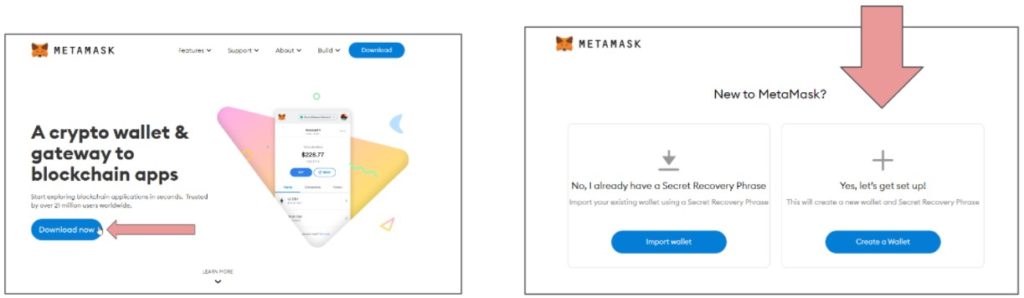
3. Send Ethereum to MetaMask
You are now ready to send the Ethereum to your new MetaMask wallet.
First, open the eToro Wallet and hit Send under Ethereum.
Then open MetaMask, copy the address of your new wallet, and paste it into the address field on eToro. From there, specify the amount of Ethereum and hit Send again.
Depending on how busy the Ethereum network is, you can expect your transaction to take from just a few minutes to over an hour.
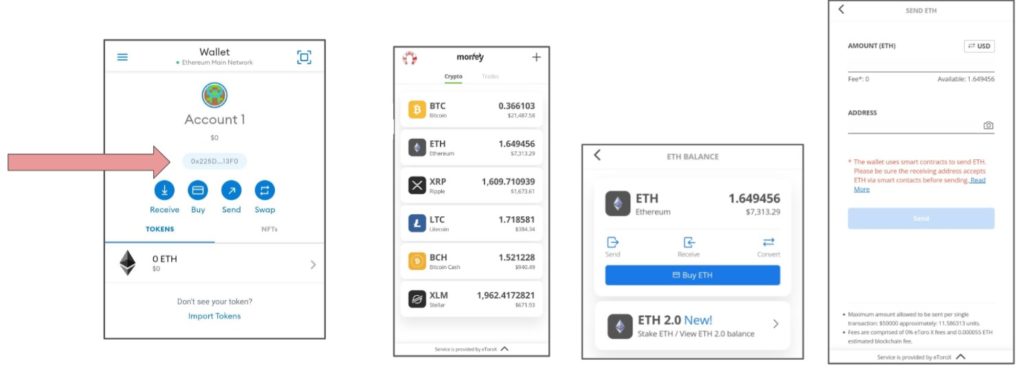
4. Connect to an NFT marketplace
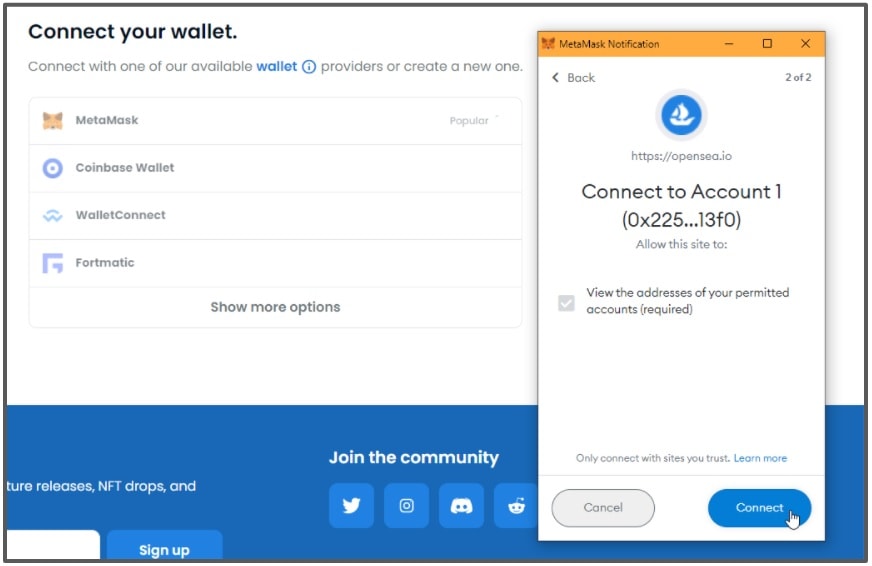
When your Ethereum has arrived in MetaMask, navigate to an NFT platform. This guide covers the largest NFT platform of them all: OpenSea.
First, navigate to the top right corner of the OpenSea homepage, hit the wallet icon and choose MetaMask. You’ll be prompted to connect your wallet.
Once connected, you can start browsing! OpenSea hosts a vast ocean of collectible avatars and artwork, with prices ranging from a few pennies to hundreds of thousands of dollars.
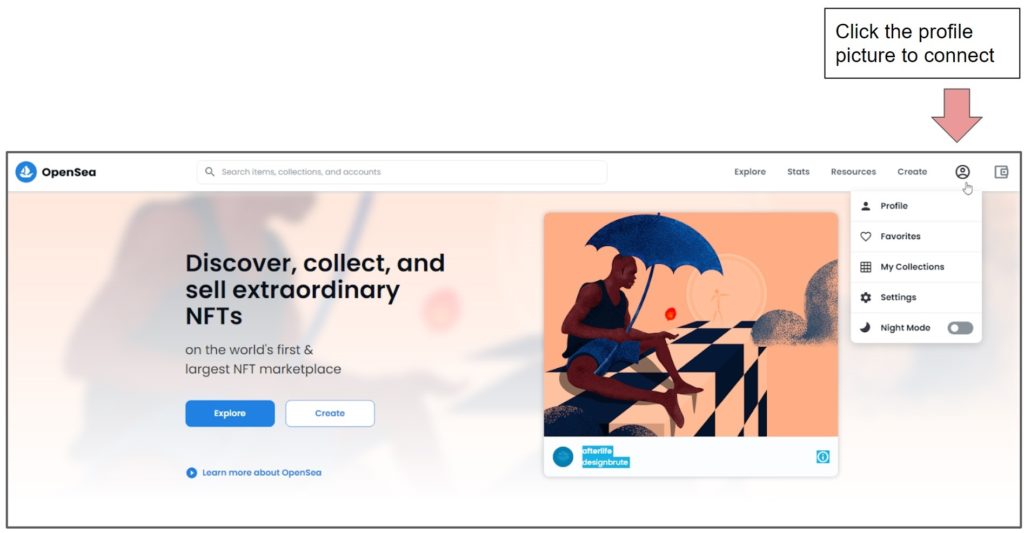
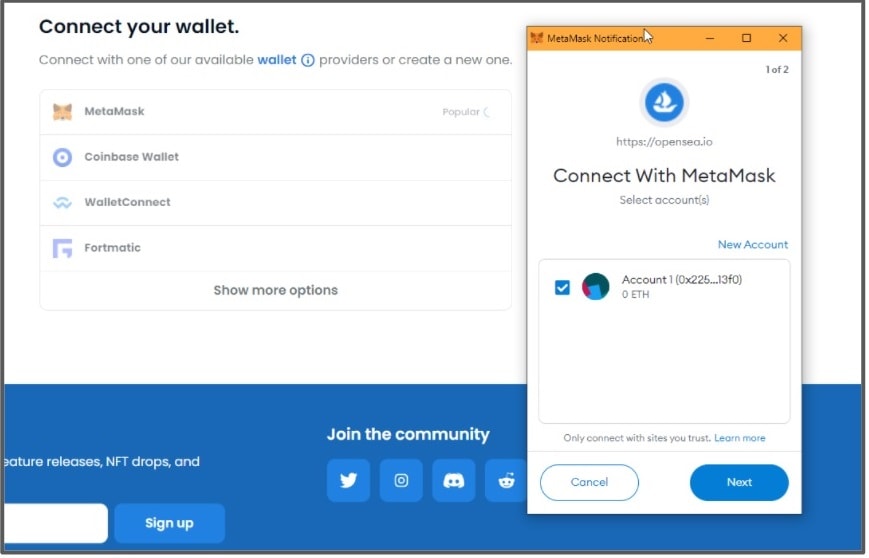
Connecting to other platforms
Most NFT platforms, including Rarible, have the same wallet connection method as OpenSea. Others, such as SuperRare, require users to create a profile before connecting.
5. Buy the NFT
Once you have found an NFT that sparks your interest, you will typically have two options: Buy now and Make offer. This gives you the choice of purchasing the item right away at the stated price, or placing a bid.
- Make offer
Hit the Make offer button, review the details, and input your bid for the NFT. At this stage you will need to convert your ETH to WETH before confirming the transaction. - Buy now
Hit the Buy now button to review details of the purchase, then move to the Checkout and review the gas fees. Finally, click Confirm to become the proud new owner of the NFT.
Cryptoassets are unregulated in some EU countries and the UK. No consumer protection. Tax on profits may apply.
This communication is for information and education purposes only and should not be taken as investment advice, a personal recommendation, or an offer of, or solicitation to buy or sell, any financial instruments. This material has been prepared without taking into account any particular recipient’s investment objectives or financial situation, and has not been prepared in accordance with the legal and regulatory requirements to promote independent research. Any references to past or future performance of a financial instrument, index or a packaged investment product are not, and should not be taken as, a reliable indicator of future results. eToro makes no representation and assumes no liability as to the accuracy or completeness of the content of this publication.